

Introducing Pixpa
Pixpa is a versatile website building platform tailored for creative professionals and small businesses looking to create visually appealing and functional websites without the need for extensive coding knowledge. With its user-friendly interface, Pixpa provides a seamless experience for users across various industries, including photographers, artists, designers, and small business owners. The platform combines modern design capabilities with robust functionality to help users build and manage their online presence effectively.
One of the standout features of Pixpa is its all-in-one approach, which integrates website building, blogging, e-commerce, and client galleries into a single platform. This coherence makes it easier for users to manage all aspects of their online portfolio without switching between different tools. Additionally, Pixpa offers built-in SEO capabilities, helping users enhance their website’s visibility in search engines and attract a larger audience.
Another advantage of Pixpa lies in its responsive design templates. These professionally designed templates are fully customizable, allowing users to create a unique look that aligns with their brand identity. Given that mobile optimization is crucial in today’s digital landscape, these templates ensure that websites look stunning on all devices, providing a consistent user experience across platforms.
Moreover, Pixpa places a strong emphasis on customer support, providing users access to extensive resources, including tutorials and responsive customer service. This commitment to support is essential for those who may be new to website creation or require assistance in troubleshooting. With its combination of functionality, ease of use, and design flexibility, Pixpa stands out as a compelling choice for anyone looking to establish a captivating online presence with relative ease.
Getting Started with Pixpa
Embarking on your website creation journey with Pixpa begins with a straightforward sign-up process. First, visit the official Pixpa website and click on the “Get Started” button. You will be prompted to create an account; here, you can either sign up using your email address or opt for a third-party login via Google or Facebook. Once you’ve completed this step, you will receive a confirmation email, allowing you to validate your account and proceed.
Upon logging in, you will be greeted by Pixpa’s user-friendly dashboard. This interface is designed to be intuitive, making navigation seamless for beginners and seasoned web creators alike. Within the dashboard, you will find various options to start building your website. To begin, select the “Create a New Site” option, which will lead you into the template selection process.https://asadmarket.com/wp-admin/post.php?post=853&action=edit#/
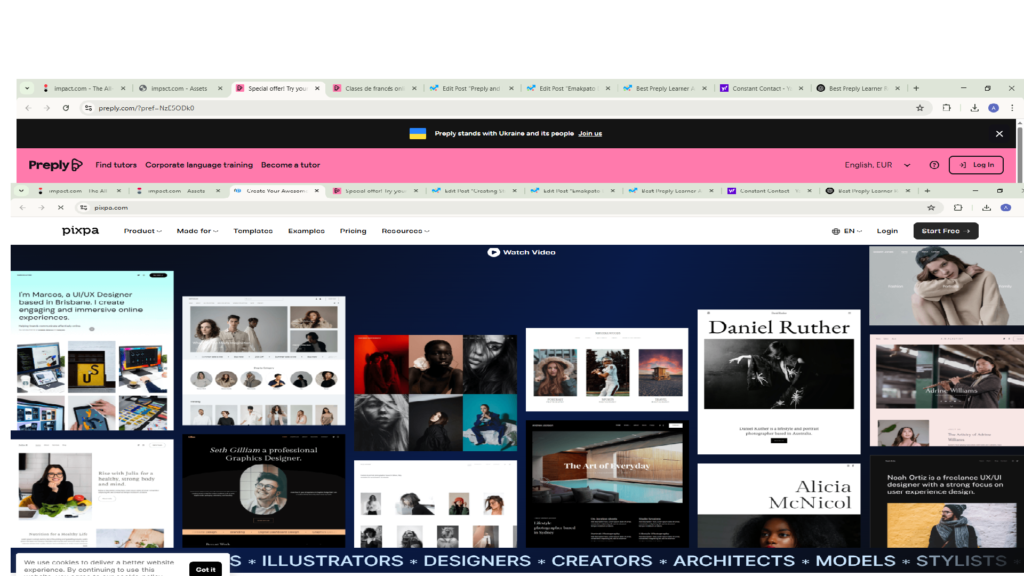
The go-to website builder for top creatives
Pixpa offers a diverse range of professionally designed templates catering to various industries, from portfolios and e-commerce to blogs and business websites. Browse through the collection, keeping in mind your desired aesthetic and functional outcomes. Each template comes with unique customization options, allowing users to tailor their websites according to personal or brand needs. Once you select a template, you can kick off the customization process. This involves utilizing the drag-and-drop editor, which permits you to rearrange elements, modify texts, and adjust colors efficiently.
Furthermore, Pixpa provides built-in tools that enhance functionality. For example, users can manage galleries, add forms, integrate e-commerce features, and more—all without needing to write any code. With this robust platform, you are well-equipped to initiate your website creation, ensuring that the path to a stunning website is not only attainable but also enjoyable.https://asadmarket.com/wp-admin/post.php?post=853&action=edit#/
Exploring Pixpa’s Templates
Pixpa offers an extensive range of professionally designed templates that cater to a variety of industries and design preferences. These templates serve as a foundational element for users looking to create a visually appealing online presence without the need for extensive coding knowledge. Each template is meticulously crafted to encompass essential design principles, ensuring that users can present their content effectively while maintaining a polished look.
One of the standout features of Pixpa’s templates is their adaptability to different industries. For artists and photographers, there are visually striking portfolios that allow for high-resolution images to take center stage. These templates often include customizable galleries and slider options that enhance the visual storytelling aspect of the user’s work. Similarly, for e-commerce businesses, Pixpa provides templates equipped with product showcase capabilities, shopping cart integration, and customer review features, which are crucial for any online retail operation.
Furthermore, Pixpa’s templates are not just about aesthetic appeal; they are also designed with responsiveness in mind. This ensures that websites adapt seamlessly across various devices, including smartphones and tablets, which is vital in today’s digital landscape. Users will find that their websites look just as stunning on a mobile screen as they do on a desktop, enhancing user experience and engagement.
One exemplary template from Pixpa is the “Creative Portfolio,” which has garnered praise for its modern layout and user-friendly navigation. This specific design enables creatives to showcase their work while embedding a personal touch. Other noteworthy templates, such as those tailored for event planners or restaurants, include features specific to those industries, demonstrating Pixpa’s commitment to versatility.
Overall, the variety of templates available on Pixpa allows users from different sectors to create professional websites that not only meet their unique needs but also elevate their brand presence on the web.
Customizing Your Pixpa Website
Customizing your Pixpa website is an essential step in enhancing its visual appeal and functionality. By making thoughtful adjustments to your chosen template, you can create a unique online presence that effectively communicates your brand message. The first aspect to consider is layout adjustments. Pixpa offers flexibility in modifying templates to better suit your needs. You can easily rearrange sections, change element sizes, and even create custom page layouts using the available drag-and-drop features. This capability allows you to create a hierarchy that guides visitors through your site intuitively.
Another critical element of customization is the use of images. High-quality visuals play a significant role in engaging your audience and presenting your content attractively. Pixpa enables users to effortlessly upload and manage images. Ensure that the images you select are not only relevant but also maintain a consistent style that reflects your brand identity. Additionally, consider adjusting color schemes to align with your brand palette. Pixpa provides various options to customize colors, allowing you to create an appealing contrast or harmony that enhances your overall design.
Fonts are equally pivotal in establishing your website’s tone and personality. Choose typefaces that reflect your brand’s identity, and maintain consistency in font usage across all pages. Pixpa conveniently allows you to customize fonts, which helps in ensuring readability and aesthetic appeal. As you customize fonts and colors, remember to maintain brand consistency to build trust and recognition among your audience. Utilizing the drag-and-drop features, you can apply these enhancements across different templates seamlessly, ensuring that every aspect aligns with your brand image. By paying attention to these details, you will significantly improve the user experience on your Pixpa website, making it not only visually appealing but also functional and user-friendly.
Adding Functionality with Pixpa Features
Pixpa provides a rich set of features that empower users to enhance their websites significantly, catering to diverse needs across various industries. One of the most notable functionalities is its integrated blogging capabilities. Users can easily create and manage a blog, which not only helps in driving traffic through valuable content but also improves search engine optimization (SEO). With user-friendly tools to format texts, insert images, and manage categories, maintaining a dynamic blog is seamless on the Pixpa platform.
Additionally, for those looking to establish an online store, Pixpa’s e-commerce options are robust and comprehensive. With simple product listings, secure payment gateways, and customizable design templates, users can create an online shop that not only showcases their products but also offers a smooth shopping experience for customers. The integration of inventory management and real-time shipping calculations further enhances the overall e-commerce functionality, making it advantageous for small businesses and entrepreneurs alike.
Client proofing galleries are another powerful feature that distinguishes Pixpa from other website builders. This function is especially beneficial for photographers and designers who need to share their work with clients efficiently. Users can create private galleries where clients can view, select, and provide feedback on images. This functionality fosters a collaborative environment, allowing for a streamlined communication process throughout the project lifecycle.
Furthermore, Pixpa’s additional features, such as customizable forms, social media integration, and SEO tools, contribute to creating an optimal user experience. By leveraging these features, users can not only enhance website functionality but also ensure their site is engaging, interactive, and aligned with modern web standards. Overall, the diverse range of features provided by Pixpa equips users to build and manage a comprehensive online presence effectively.
Optimizing for SEO on Pixpa
Search engine optimization (SEO) is crucial for any website aiming to increase visibility and attract organic traffic. For Pixpa users, optimizing their websites can profoundly impact their success in reaching potential clients or customers. First and foremost, it is essential to create high-quality, engaging content that caters to the needs of your target audience. This content should naturally incorporate relevant keywords that reflect what users might search for, thereby enhancing the chances of appearing in search engine results.
Meta descriptions are another significant element of SEO on Pixpa. These brief summaries appear under the webpage title in search engine results and should entice users to click through to your site. A well-crafted meta description includes the primary keyword and conveys the essence of the webpage in a concise manner. Additionally, ensuring that each page of your website has a unique meta description can prevent redundancy and improve overall search engine performance.
Image optimization is also essential for Pixpa websites. As visual platforms are increasingly popular, using appropriate image tags, known as ‘alt tags,’ provides search engines with context about the images on your site. These tags should also contain relevant keywords when appropriate. Additionally, reducing image file sizes can enhance load times, significantly improving user experience and indirectly benefiting SEO rankings.
Furthermore, utilizing header tags (H1, H2, H3) effectively can structure content, making it more readable for both users and search engines. Each page should ideally consist of a single H1 tag, which represents the main title, followed by hierarchically organized subheaders. Incorporating internal and external links can also enrich content and encourage user engagement, while sending positive signals to search engines.
By focusing on these SEO strategies within your Pixpa website, you will optimize your visibility and enhance website performance, ultimately driving more traffic and conversions.
Mobile Responsiveness in Pixpa
In the digital landscape, mobile responsiveness has become a critical aspect of website design. With a significant portion of web traffic originating from mobile devices, ensuring that your website provides an optimal experience across various screen sizes is essential. Pixpa, a versatile website-building platform, understands this necessity and automatically optimizes sites for mobile viewing. This feature is particularly beneficial for users who need a website that functions seamlessly on smartphones and tablets without requiring extensive coding knowledge.
When utilizing Pixpa to create a website, users can be assured that their content and layout will adapt to different resolutions and screen sizes. The automatic mobile optimization ensures that images, text, and interactive elements adjust accordingly, maintaining the integrity of design regardless of the device used. This adaptability is crucial in avoiding issues such as content overflow, scrolling difficulties, or distorted images, which can deter visitors from engaging with the site.
While Pixpa’s built-in mobile optimization provides a solid foundation, there are additional steps you can take to further enhance the mobile user experience. First, consider simplifying your navigation. A cluttered menu can overwhelm mobile users, so opt for streamlined options that focus on key areas of your site. Secondly, prioritize the loading speed of your mobile pages; a fast-loading site can significantly decrease bounce rates and improve user satisfaction. Compressing images and utilizing lighter, mobile-friendly design elements can aid in this aspect.
Furthermore, testing your website across multiple devices is vital. Pixpa allows users to view how their site appears on different screens, enabling adjustments before going live. Keeping user feedback in mind can also help fine-tune the mobile experience by identifying pain points and preferences among visitors. A mobile-optimized website created through Pixpa ultimately enhances user engagement and satisfaction, making it essential for businesses looking to establish a strong online presence.
Launching Your Pixpa Website
Launching a website built on Pixpa is an exciting milestone, and ensuring that you have completed all necessary preparations will set you up for success. The first step in this process involves setting up a custom domain, which enhances your site’s branding and credibility. To do this, navigate to your Pixpa dashboard and select the ‘Domains’ option. Here, you can either purchase a new domain directly through Pixpa or connect an existing domain from a third-party provider. Following the prompts will guide you through configuring the DNS settings, which is crucial for linking your domain to your website effectively.
Once you have your custom domain accurately set up, it is time to move on to the publishing phase. Pixpa makes this simple; you can find the ‘Publish’ button on your dashboard, which will initiate the process. Before proceeding, it is advisable to double-check your website’s settings, including SEO options and privacy settings to ensure they align with your goals. Remember to also verify that all images, text, and links across the site are functioning correctly, as this reflects on your site’s professionalism.
Conducting pre-launch checks is essential to avoid any last-minute surprises. This involves a thorough review of each page, testing on different devices to assess responsiveness, and ensuring that all forms and interactive elements are operational. Utilizing Pixpa’s preview option allows you to see how your site appears to users. Additionally, consider seeking feedback from peers or potential visitors for their insights before the official launch. Doing so can provide valuable perspectives that you may not have considered. By completing these steps diligently, you will be well-prepared for a successful website launch on Pixpa.
Ongoing Maintenance and Support
After launching a stunning website with Pixpa, it is crucial to understand the importance of ongoing maintenance and support to ensure its continued effectiveness. A website requires regular attention to function optimally, and Pixpa provides numerous resources that can assist users in this endeavor.
One of the key components of website maintenance is performing regular updates. Pixpa frequently releases updates that enhance functionality, security, and overall performance. It is advisable to routinely check for these updates and apply them promptly. By doing so, users can take advantage of the most current features and improvements, thereby maintaining the site’s competitiveness and security. Pixpa’s user-friendly interface makes it easy to navigate through available updates, ensuring users can efficiently manage their website.
Monitoring site performance is another vital aspect of ongoing maintenance. By analyzing-site traffic, user engagement, and page load times, website owners can identify areas needing improvement. Pixpa provides analytical tools that allow users to track performance metrics effectively. This data can help users understand their audience better, enabling them to make informed decisions about content, design, and functionality enhancements that cater to visitor preferences.
Additionally, Pixpa offers extensive support resources, including tutorials, FAQs, and customer service options. Users experiencing challenges can benefit from these resources to troubleshoot common issues or learn best practices for website management. Engaging with the Pixpa community through forums and social media channels can also be a valuable way to exchange strategies and gain support from fellow website owners.
In conclusion, maintaining a website built on the Pixpa platform is an essential ongoing commitment. By utilizing Pixpa’s updates, monitoring site performance, and accessing the provided support resources, users can ensure their websites remain effective, engaging, and secure over time.